ZX Spectrum Next
The ZX Spectrum Next is emulated from its FPGA core: the Z80N CPU at 3.5 to 28 MHz, 1 or 2 MB of RAM, layer 2, sprites, the tilemap, LoRes, the copper, the DMA, hardware IM2 and the CTC, three AY chips with DACs, the clock and the Wi-Fi module. Like the real machine, it starts from an SD card: its firmware loads the ROMs and NextZXOS from the card’s files.
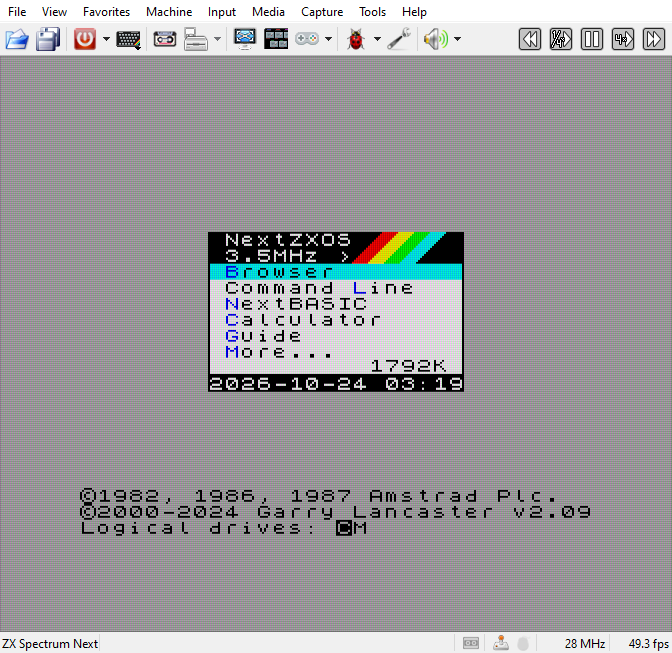
The machine
Pick ZX Spectrum Next in Machine > Model or on the Machine page of Options.
It stands in a group of its own, after the Sinclair and Amstrad models. On the command
line it is -m zxnext.
The Next sets its own CPU speed, 3.5, 7, 14 or 28 MHz, as programs ask, and its sound chips, joysticks, contention and the rest from NextZXOS’s settings. So the Machine page of Options shows what the machine has set, in groups of the Next’s own (see On the ZX Spectrum Next). The picture always shows at least the full border (see View menu).
The Next has three buttons on its side, RESET, DRIVE and NMI:
RESET: a click on Machine > Reset, or F12, presses it. That is a soft reset, which keeps the memory and the card; Soft Reset in the Reset menu is the same, in place of the other machines’ choices. Hard Reset switches the Next off and on: the firmware starts again and loads everything from the card. On the Next itself, holding RESET for a second is a hard reset.
NMI: Machine > NMI presses it. NextZXOS stops the program and shows its NMI menu: snapshots, screenshots, pokes and the like (see NMI).
DRIVE: the divMMC’s NMI button. Only esxDOS uses it, when the Next boots a machine with esxDOS in place of NextZXOS; NextZXOS turns it off. Xpeccy+ boots the Next with NextZXOS only, so the menus have no DRIVE command. F10 presses it, as on the Next’s own PS/2 keyboard (see Keyboard and joysticks).
Memory, on the Machine page of Options, is 2048 KB or 1024 KB. The base model of the first Nexts had 1 MB and room for 1 MB more; later boards all have 2 MB. A program meant for every Next should run on 1 MB: NextZXOS then has 768 KB for programs, banks 0 to 47, and the Pentagon 1024 mode reaches 768 KB. A change of Memory switches the Next off and on, since NextZXOS counts the memory when it starts.
On 1 MB, a write past the first megabyte is lost. A read there gets what the data bus still holds: the last byte that went over that half of the bus - an instruction, a byte the program wrote, a layer 2 pixel. That follows from how the board is wired; it has not been measured on a real 1 MB Next, where the bus may also lose its charge after a while. Layer 2 shown from banks past the first megabyte shows bytes #FF.
The divMMC and the Multiface are built into the Next, so the divMMC setting of other machines is not shown for it. The Next has no floppy drives, and a tape does not start by itself on it.
The SD card
The Next starts from a card with System/Next on it: the official release of its ROMs, NextZXOS and the programs that come with it. System/Next is not part of Xpeccy+. The program makes a card from the official release when the Next needs one.
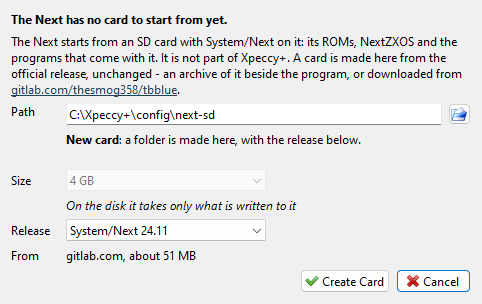
The ZX Spectrum Next SD Card window opens by itself when the Next has no card to start from: the first time, or when its card was moved, deleted or has no System/Next on it. A card of yours in the slot without System/Next, with no card of the Next’s own, opens it on your card. Its first line then says which. Media > SD Card > System/Next Card… opens it at any time.
Field |
What it sets |
|---|---|
Path |
a card you have, or where to make a new one; the button beside it picks a Folder… or an Image… |
Size |
for a new image, 1 to 16 GB; on the disk it takes only what is written to it |
Release |
the System/Next release to put on a new card |
From |
where the release comes from: an archive downloaded before, one beside the program, or gitlab.com, about 51 MB |
The line under Path says what the window will do with it:
Path |
The window |
|---|---|
a folder or an image with System/Next on it |
Found: Use This Card puts it in as it is |
a new or empty folder |
New card: Create Card makes the card in it |
a new name ending in |
New card: Create Card makes an image of the size chosen |
a folder with other files |
leaves it alone; a link makes the card in |
a file without System/Next |
leaves it alone; pick another, or type a new name |
Create Card downloads the release, checks it, and makes the card: a folder, next-sd, in
the settings folder by default. The release goes onto the card unchanged. A release with no
checksum known to Xpeccy+ is marked (not checked).
The new card goes in at once, and the Next starts from it. The archive is downloaded and
unpacked inside Xpeccy+, with a progress bar and Cancel; on Linux the download uses the
system’s libcurl, which nearly every distribution has. A .tar.gz or a .zip beside the
program needs no download at all.
The Next’s own card. The card made or picked in this window is the Next’s own: it goes in whenever the Next runs. A card of yours in the slot that has System/Next on it is used instead. A card without System/Next is put aside while the Next runs, the message no System/Next: the Next’s card in appears, and the card comes back for the next machine. Media > SD Card > Eject on the Next puts its own card back.
The SD Card menu has the same items as on the ZX Evolution: Open Image…, Open
Folder…, Eject, Refresh and Write Protect (see SD card).
The --sdcard option of the command line sets the card too.
Writing. A card made here takes what NextZXOS writes, with no question. A folder of your own follows the Folder as a disk settings and asks the first time (see Writing to a folder); an image is written to directly. A folder keeps files, not everything a card holds (see What a folder cannot do): for full compatibility, use an image card.
The card’s config.ini and menu.ini choose the ROMs, and config.ini’s timing= the
video timing, VGA 0 or VGA 1. Its other settings are not read.
Starting programs
Open .nex programs and .snx snapshots as any file: by File > Open, by dropping them
on the window, or on the command line (see File menu). They need the Next, and on
another machine Xpeccy+ switches to it. On the Next, .sna snapshots of the 48K and the
128K open the same way; snapshots of other machines switch to a machine that runs them. A
.z80 names its model, so with Auto on the
File types page it switches to that model; with Keep current,
or the Next picked for .z80 there, it opens on the Next too.
The Next does not load a program into its memory directly, as its firmware would start
over anything put there. Xpeccy+ types the commands on the keyboard instead, as you would:
NextZXOS’s NextBASIC, .cd to the program’s folder, and .nexload for a .nex or
SPECTRUM for a snapshot. The picture stays blank in fast mode while it types.
A program on the card is started where it is, and its saves stay on the card.
A program from elsewhere is put on the card as an extra folder for as long as the card is in. The Next is switched off and on first, so that NextZXOS sees the new folder. The folder comes with everything in it, for the files a program reads beside it - unless it holds over 2000 files and folders, a collection, or the program is a
.snaor.z80: then the program’s file is the only one in it. What the program saves there is kept only in memory and lost on a reset; the message saves lost on reset: put the game on the card says so. To keep saves, copy the program into the card’s folder.
This works with a card that is a folder, not an image. With an image card, or none, the message is NEX and SNX files start from NextZXOS: put the System/Next folder in the SD card slot. A file name with letters that cannot be typed in NextZXOS is replaced by its short name on the card; where even that fails, the message is The file’s name cannot be typed in NextZXOS.
Snapshots
File > Save… saves the whole Next as an .szx snapshot: its memory, the nextregs, copper,
palettes, sprites, layers, DMA, the clock chip and the ESP-01. Quick Save, the autosaves,
Resume Last Session and RZX recording work on it as on other machines (see
Quick saves and RZX). Other programs cannot open
these files: the SZX format has no ZX Spectrum Next. A snapshot taken on 1 MB runs a 2 MB
Next on 1 MB, and the other way round, until another machine is chosen or the program
is closed. Memory in
Options still shows the machine’s own size; picking the other one there makes it the
machine’s.
The SD card is not in the snapshot - it is far too big - but NextZXOS keeps in memory what it read from the card. So the snapshot names the card, and the folder of a program opened from elsewhere, and loading it puts them back. When the files on the card have changed since the save - added, removed, renamed or written - a line on the screen says so: what the program had open on the card may read wrong. A card moved or copied with its files’ dates kept is the same card. A snapshot that names no card - from another program, or of another machine - leaves the card in as it is. The ESP-01’s network connections are not in the snapshot either: after loading, the program finds them closed.
Keyboard and joysticks
The computer’s keyboard is the Next’s PS/2 keyboard, with the US layout of its core, or
the layout the card’s keymap.bin sets. Letters, digits and the keys of the Next’s own
row map as below. The PC keyboard setting of other machines is not shown for the
Next.
Key |
Next key |
|---|---|
Shift |
CAPS SHIFT |
Ctrl |
SYMBOL SHIFT |
left Alt |
EXTEND |
right Alt |
GRAPH |
Esc |
BREAK |
Backspace |
DELETE |
Caps Lock |
CAPS LOCK |
|
EDIT |
arrows |
the Next’s arrow keys |
|
the Next’s |
|
SYMBOL SHIFT with V, J and L |
Type PC Symbols of other machines does not apply here: Shift is CAPS SHIFT with every key, as on the Next’s own PS/2 keyboard.
Some hotkeys of Xpeccy+ use Alt too: change them on the Hotkeys page of Options if they get in the way.
The F-keys work as on the Next’s PS/2 keyboard:
Key |
On the Next |
|---|---|
F3 |
switches between 50 and 60 Hz |
F4 |
soft reset: a short press of RESET |
F8 |
the next CPU speed: 3.5, 7, 14, 28 MHz |
F9 |
the NMI button, when let go within a second |
F10 |
the DRIVE button |
As on the Next, a digit pressed while F9 is held down is a function key instead, 1 to 0 for F1 to F10, and F9 then sends no NMI: F9 with 1 is a hard reset, the firmware starts again and the memory is kept. Machine > NMI is a press and release at once, so it cannot be held with a digit: hold F9 for that.
An F-key that is a hotkey of Xpeccy+ stays a hotkey: F3, F4, F9 and F10 are hotkeys in both presets. To give them to the Next, turn on Grab Keyboard. F8 is not a hotkey, so it changes the speed even without that. A program can turn F3 and F8 off. The Next’s other function keys change only its video output or the expansion bus, so they do nothing here.
The virtual keyboard has three Next skins: Next (Black), Next (White) and Next (Magenta). With By machine on, the Next gets the one of the tone picked last (see Virtual Keyboard). Its arrows, EDIT, DELETE and the other keys of the Next’s own row press those keys, not a key with a shift.
The Next has two joystick ports. Its firmware sets the left one to Kempston 1 and the right one to Sinclair 1; a program may change them. Player 1’s gamepad is the left joystick, and the mouse is the Next’s Kempston mouse, with its wheel (see Input menu).
Wi-Fi and serial ports
The Next has two UARTs: one to the ESP-01 Wi-Fi module, one to the Raspberry Pi’s connector. The ESP UART and Pi UART rows on the Machine page of Options say what is on each, and are shown only for the Next (see Machine page).
Choice |
Meaning |
|---|---|
Not connected |
nothing on that UART |
ESP-01 (emulated) |
ESP UART only, the default: the Wi-Fi module of Xpeccy+ |
a serial port, such as |
a serial port of this computer, with a real module or another device on it |
A serial port follows the speed and the format the program sets. The list shows the ports
of this computer; a name can also be typed, such as a named pipe \\.\pipe\NAME on
Windows. For one run only, the command line has --uart-esp PORT and --uart-pi PORT
(esp for the emulated module, - for none).
The emulated ESP-01 answers as Espressif’s AT firmware 1.7.6 does. The connections a
program opens go out through this computer’s network, so programs such as Internet
NEXTplorer work. The module sees one access point, named
Xpeccy+, which takes any password; the computer’s own Wi-Fi is never seen. A server
the module opens takes clients from this computer only, at 127.0.0.1; tick Server on
the network in the row’s window to let other computers in. The module’s settings are
kept in the nvram folder of the settings.
Not there: secure connections (SSL/TLS), joining the module’s own access point, and updating the module’s firmware.
The clock. The Next’s clock keeps the time it was set to, in nvram/zxnext.rtc of
the settings folder. Until it is set, it shows the computer’s time.
In the Debugger
The Debugger has a ZX Next panel for the Next’s registers, sprites, copper, layers, tilemap, palettes and DMA: see ZX Next panel. The Palette panel is there too; CMOS, FDC and FDD are not.
Not emulated yet
the second SD card slot, the Raspberry Pi accelerator and the FPGA flash;
devices on the expansion bus;
the keys for the Next’s video output (scandoubler, scanlines);
video timings other than VGA 0 and VGA 1, and the settings of
config.iniother than the ROMs and the timing;Look ahead of the adaptive anti-flicker modes (see View menu).