File types page
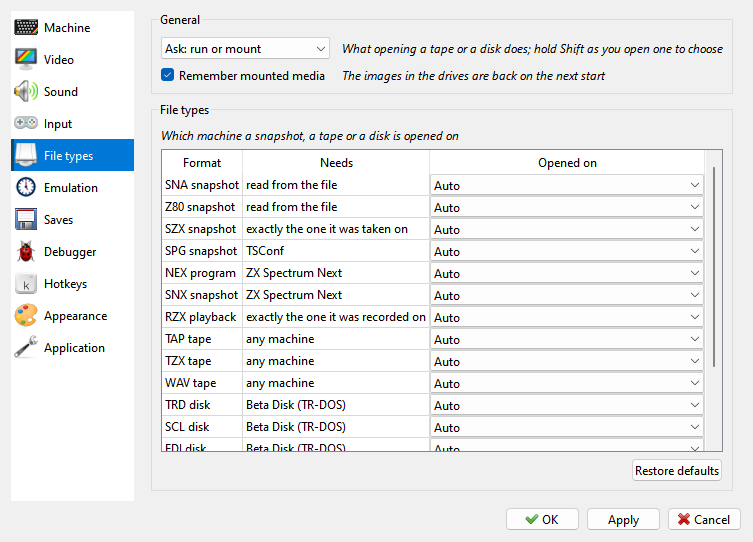
What opening a tape or a disk does - run it, mount it, or ask - and whether the media in the drives come back at the next start. The table says which machine each kind of file opens on.
What a file needs and which machine it switches to are explained in Run a program. The File types page of Options sets this for each format.
The General group at the top of the page:
Run opened media, Mount opened media or Ask: run or mount - what opening a tape or a disk does. Ask shows the Open Media question; ticking Remember my choice there saves your answer in this setting.
Remember mounted media - the tape and the disks in the drives are opened again at the next start.
The File types group has a row per format:
Format - the kind of file.
Needs - what a machine must have to run it: any machine, Beta Disk (TR-DOS), +3 disk drive, TSConf, ZX Spectrum Next, read from the file (a
.z80names its model, a.snanames only 48K or 128K), exactly the one it was taken on (SZX) or exactly the one it was recorded on (RZX).Opened on - Auto, Ask, Keep current, or one machine from the list.
A tape runs on any machine, so its rows have no Ask: Auto in these rows only switches back to your own machine after another file switched away from it. A machine picked in Opened on is used for every file of that format that it can run. Restore defaults sets every row back to Auto.
Only a file that is about to run can switch the machine: a snapshot always, a tape or a disk only when it is run, and a disk only from drive A.
A .z80 names the model it was taken on, as an .szx does, and Auto opens it on that
model: a 48K one on the 48K, a 128K one on the 128K rather than on a +2 or a Pentagon. The
48K, the 128K and the Pentagon each have a frame of their own length, so a program timed to
the screen runs right only on its own. A Pentagon 1024 counts as a Pentagon. Keep current leaves it where you are.
Any other snapshot - a .sna, or a .z80 with Ask or a machine picked in Opened on -
runs on any machine with its memory paging. One taken inside the ROM - in the 128K menu or
the BASIC editor, or in the middle of a ROM routine - also needs the very same ROM:
A
.z80taken in the menu or editor runs only on the model it names. Even the clones’ ROMs differ there: the Pentagon’s menu has a TR-DOS item the 128K’s has not. The +2A and +3 share their ROMs, but a +3’s disk system is set up for its drive. One stopped in a 48 BASIC routine needs the same editor: a 128K one runs on the 128K and the clones, not on the +2, +2A or +3.A
.snanames no model. For one taken in the menu or editor, Xpeccy+ tells a +2, a +2A or a +3 by what the ROM left in memory. A 128K and its clones share that code, so for them, and whenever the snapshot does not tell, Auto asks which machine to use, as Ask does. To keep the model, save as.z80or.szx.A
.snaof a program running in RAM stays on the current machine: a.snais looked at only when it was stopped inside the ROM. A.z80of one that keeps the 128K editor’s ROM paged in needs a machine with that editor, which the +2, +2A and +3 do not have.
A machine of your own counts by its hardware, whatever ROM files it has.