Tape panel
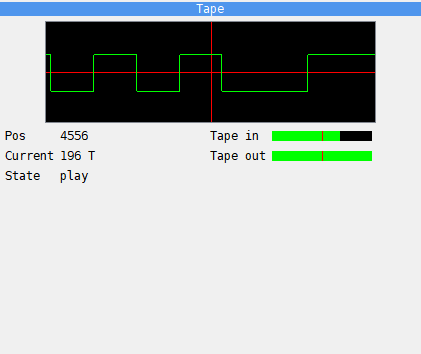
The Tape panel draws the tape signal around the place the tape is at. The red vertical line is the current position: on its left is the signal that has played, on its right what comes next. The picture covers about two milliseconds of tape at the machine’s speed. In the picture Exolon is loading, with fast loading off.
Field |
What it shows |
|---|---|
Pos |
the number of the pulse in the current block; |
Current |
how much of the current pulse is left; empty while the tape is stopped |
State |
play, rec or stop |
Tape in |
the level the tape plays into the machine’s EAR input |
Tape out |
the bit the machine sends to the tape: the bar is full while it is 1 |
Use it while you step through a loader, to see which pulse it is reading and what comes next. The tape itself is controlled from the Tape Player (see Tapes).