STACK panel
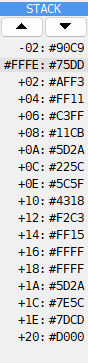
Each line of the STACK panel is a word in memory, starting near the address SP holds.
The shaded line is the word at SP, named by its address. The lines above and below it are
named by their distance from SP: -02:, +02:, +04: and so on. The panel shows as
many lines as fit in its height. The address and the words are written as the Debugger’s
addresses are, and the distances in the same base: see
Hex or decimal.
The two arrows at the top move the lines by a word. The first line can be from 16 bytes
before SP to 16 bytes after it. Where the panel starts is the Stack offset on the Debugger page of Options:
-2 by default, so the word just above SP is in view too.