Cheats
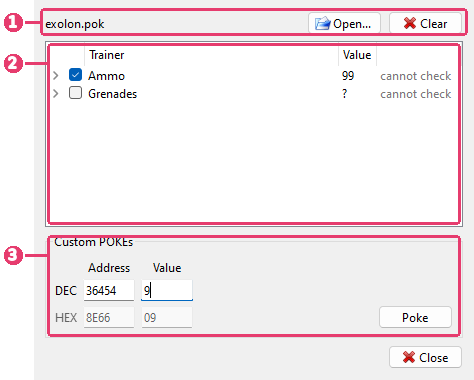
The cheat file in the window. Open… reads another one, Clear turns every cheat off and empties the window.
Its trainers. A tick turns one on.
Custom POKEs - pokes of your own, one byte at a time.
Tools > Cheats opens the window. It works while the machine runs: a tick changes the machine’s memory at once, and there is nothing to apply.
Cheat files
A cheat file (.pok) holds trainers: infinite lives, more time, a level to start on. Each
trainer is a few pokes - bytes written into the game’s memory. Game archives often carry
one in a POKES folder beside the tape or snapshot.
Open one as any other file: File > Open, a drop onto the picture, File > Recent, or the command line. The Cheats window opens with it. Opening a cheat file does not reset the machine or replace anything in it.
When you open a tape, snapshot or disk, Xpeccy+ looks for its cheat file by itself:
POKES\NAME.pok beside the image, then NAME.pok beside it, where NAME is the image’s
name. A name in the TOSEC style, such as Game (1986)(Publisher)(128K)[a].tzx, is then tried
without its tags in square brackets, Game (1986)(Publisher)(128K), and then cut down to the
game and its publisher, Game (1986)(Publisher) - the way TOSEC sets name their cheat files.
An image opened from inside an archive is not looked for. The file goes into the window
with nothing ticked, and the window says
(found beside the image). Opening an image without one takes such a file out of the
window again; a file you opened yourself stays, and so does the game’s own when you pick
another side of it from its list.
A program that starts Xpeccy+ with a game can also hand its trainers over on the command line, with no file (see Cheats). The window then says Command line, and the trainers stay with the game as its own cheat file would.
A file that is not a cheat file at all is refused with a message.
Turning a trainer on
Tick a trainer to poke it into the machine. Untick it, and the bytes it changed are put back as they were. A byte the game has changed since, or loaded again, stays as the game has it.
Some trainers ask for a value, such as the number of lives. A ? in the Value
column marks them: ticking one asks for the number, from 0 to 255 (# for hex). Click the
value to change it while the trainer is off.
The column after it says what the window knows about the trainer:
does not match this release - the file says which bytes the trainer changes, and memory holds others. The file is for another release of the game, or the game has not loaded yet. Ticking it asks before poking.
cannot check - the file does not say what the bytes were, so there is nothing to compare. The trainer is poked when ticked.
needs 128K - it pokes a memory page this machine does not have.
no RAM there - it pokes an address where the machine has ROM now.
bad: and a line number - that part of the file cannot be read. The trainer cannot be ticked.
Click the arrow before a trainer to see its pokes: the address, the value, and what was there before if the file says. A poke for a 128K page goes into that page, whatever page the machine has in its memory at the moment.
Custom POKEs
Type an address and a value, as BASIC’s POKE takes them: in decimal on the DEC row, or
in hex on the HEX row under it. Typing in one fills in the other. The row without the
cursor is dimmed.
Enter in Address goes on to Value. Enter in Value pokes the byte, moves the address on by one and keeps the value ready to be typed over, so a run of bytes goes in one after another. Poke does the same as Enter.
The address is the one the processor sees, with the memory paged in now. An address in ROM is refused.
Every byte poked this way goes into the Custom row of the list. Untick it to put the original bytes back, last first; tick it to poke them again. Clear at the top empties it, with the cheat file.
When cheats go off
A reset, opening another file, a machine switch, Quick Load and Undo Quick Load turn every cheat off and write nothing back: the memory they changed is gone. The cheat file stays in the window.
Opening the game’s tape or disk again, by File > Reload or any other way, turns every cheat off and puts their bytes back first, before the game is loaded again.
Rewind keeps cheats on: a trainer whose bytes are back to the originals after going back in time is poked again. One whose bytes are something else goes off.
An RZX recording takes in each cheat turned on or off, so it plays back the same. While an RZX plays, the window does not poke.
Cheats last until the program closes. A snapshot saved while a cheat is on has the poked bytes in it.
Cheats has no key by default: set one on the Hotkeys page of Options, under Tools. The toolbar can have it too: right-click the toolbar, Buttons > Tools.