Emulation page
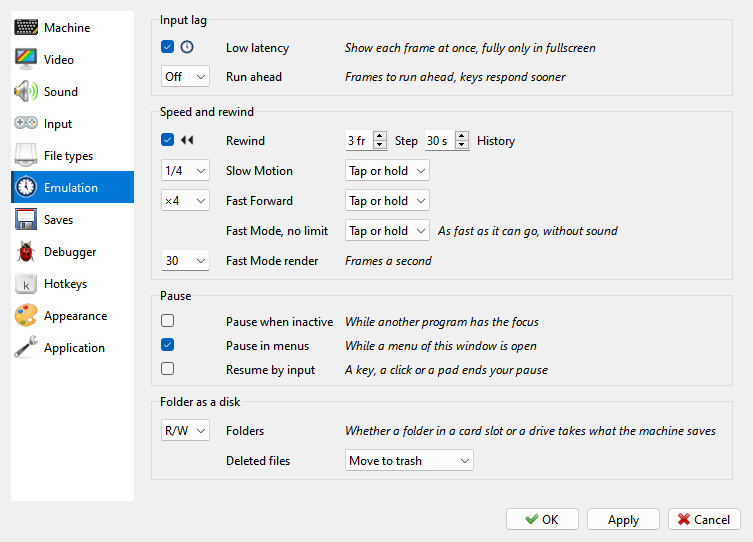
Input lag - Low latency and Run ahead. See Input lag.
Speed and rewind - how far back rewind goes, how the keys of Slow Motion, Fast Forward and Fast Mode work, and what Fast Mode shows. See Speed and time.
Pause - Pause when inactive, Pause in menus and Resume by input: when the machine stops by itself and what lets it go on. See Pause.
Folder as a disk - whether a folder used as a card or a disk takes what the machine writes, and where a file it deletes there goes. See Writing to a folder.
Input lag
The Input lag group on the Emulation page sets how soon a key press shows on the screen.
Low latency shows each frame as soon as it is made. In a window the desktop still holds each frame back by one more frame; in fullscreen that delay is skipped too, but menus then flicker as they open. With Low latency off, frames are buffered, for smoother motion. It is on by default.
Run ahead makes keys respond sooner by one or two frames. Each frame, the program emulates that many frames further, shows the picture from there, and goes back. So you see the result of a key press a frame or two earlier than the machine itself would show it. The cost is CPU time - the frames are emulated more than once - and the sound stays a frame behind the picture. Off is the default. Run ahead does nothing while an RZX recording plays, in Fast Mode and Fast Forward, while the machine is paused, and while you rewind. Where the lag comes from, and the settings for the least of it, are in Low input lag.