Sound page
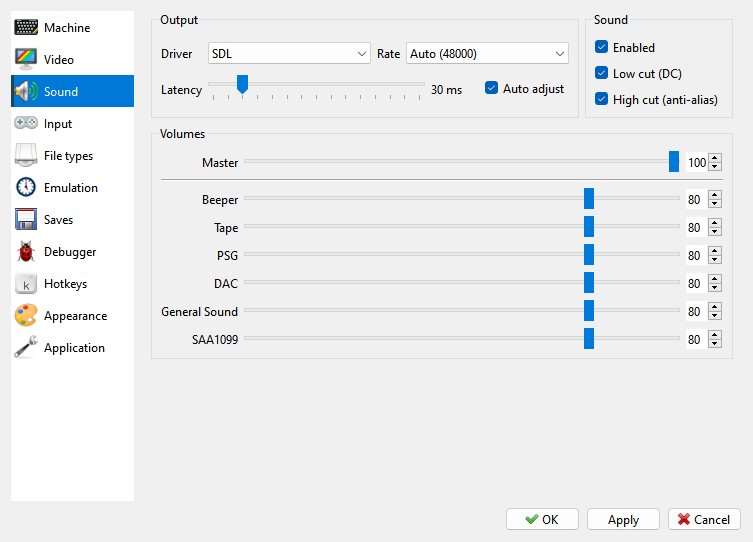
What you hear comes from the machine’s own sound devices - the beeper, the tape, and whatever sound chips and cards the machine has. Which devices a machine has is set on the Machine page of Options (see Sound devices); how the sound is played and how loud each device is are on the Sound page.
Options > Sound has three groups.
Output - how the sound reaches your speakers:
Driver - SDL plays the sound; NULL plays nothing.
Rate - the sample rate: Auto uses the rate of your computer’s sound device and shows that rate; 48000 and 44100 set a fixed rate.
Latency - how much sound is kept ready ahead of playback, from 10 to 150 ms. A lower value makes the sound follow the picture and the keys more closely; a value too low makes the sound click. With Auto adjust ticked (the default) the program finds the value by itself: it raises the latency when the sound runs short and lowers it again after a long time with no gaps. The slider then shows the value the program has settled on.
The Sound group beside Output has three switches:
Enabled - with it off, the program plays silence. The machine still runs at its normal speed, and its sound is not worked out at all, which leaves more of the computer to the emulation. The Debugger’s scope and the sound of a rewind are silent for that time too.
Low cut (DC) - takes out the lowest frequencies. The chips’ output sits above zero rather than around it, and that offset only takes loudness away from the rest of the sound. On by default.
High cut (anti-alias) - takes out the frequencies too high for the output rate. Without it they come back as false notes, which is heard most in beeper music as a harsh crunch. On by default; it costs a little CPU time.
Volumes - one slider for each device, from 0 to 100:
Volume |
What it sets |
|---|---|
Master |
everything together; the same as the toolbar’s volume |
Beeper |
the machine’s own speaker |
Tape |
the tape, while it plays or records |
PSG |
the AY or YM sound chips |
DAC |
Covox and Soundrive |
General Sound |
the General Sound card |
SAA1099 |
the SAA1099 chip |
The Sound page is the same for every machine.
Beeper
The beeper is the machine’s own speaker, and every machine has it. Its volume is Beeper on the Sound page. MIC in the beeper, in the ULA group of Machine: Advanced Settings, also mixes the signal the machine sends to the tape into the beeper sound, a tenth as loud, as a machine with a ULA does (see Advanced settings).
Recording the sound
Capture > Record Sound to WAV… writes what you hear to a file; see Capture menu.