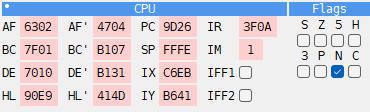
CPU panel

The CPU panel shows the Z80 registers: PC, AF, BC, DE, HL, SP, the alternate set AF’, BC’, DE’, HL’, then IX, IY, IR, IM and the interrupt switches IFF1 and IFF2. Under them are the flags S, Z, 5, H, 3, P, N and C.
A register that changed in the last step is marked in the Changed color of the Debugger page of Options. With Split pairs on, only the byte that changed is marked: after an instruction that changes only A, only the A half of AF lights up.
The values are hex or decimal, as the Debugger’s other numbers (see
Hex or decimal). In decimal a pair is two numbers with
Split pairs on, a byte each in a field of its own, as 1 | 255 for HL = 511, and each
lights up on its own; with Split pairs off it is one number, 511. PC and SP are as
wide as a pair, and IM as one byte of it; every number stands at the right of its field.
Rest the mouse on IM, IFF1 or IFF2 for what it is. The tip of IM also says where an INT goes now, as the tip of INT in the side panel does (see MEMMAP panel).
Changing registers
Click a value and type over it, in hex or in decimal as it is shown. The change takes effect at once. In a value field:
Up and Down, or the mouse wheel, add or subtract 1;
PgUp and PgDn add or subtract 256;
X switches the field between hex and decimal.
IFF1 and IFF2 are check boxes. Tick or untick a flag to change it in F.
Click the name of a register to see, in the listing, the code at the address the register holds. Right-click the name to see that address in the DUMP panel.
IM and IR are no addresses, so they point at where an INT goes instead:
click IM or IR - the listing shows the interrupt handler: in IM 1
#0038, in IM 2 (and for IR always) the address from the table at I * 256;right-click IM - DUMP shows the word of the table the CPU reads in IM 2, the handler in IM 0 and IM 1;
right-click IR - DUMP shows the table itself, from I * 256.
Layouts
Right-click the panel’s title bar to choose how the registers are laid out. A small dot in the corner of a title bar shows that the panel has such a menu.
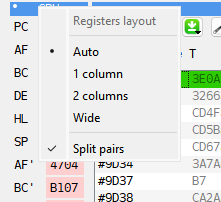
Auto (the default) - one column when the panel is narrow, two when it is wide enough. Auto also uses two columns when two panels stand side by side under the CPU panel.
1 column - a register on each line.
2 columns - two on a line, each beside its pair: AF beside AF’, PC beside SP.
Wide - a column for each kind: AF, BC, DE, HL; the alternate set; PC, SP, IX, IY; and IR, IM, IFF1, IFF2. The flags are one more column beside them, under the title Flags.
Split pairs - mark only the byte that changed, as above, and in decimal write a pair as two numbers. On by default.