MEMMAP panel
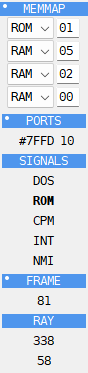
The MEMMAP panel holds a few small blocks, one under another. The Debugger page of Options sets which of them are shown.
The rows at the top are the Z80’s memory windows: four 16K banks on most machines, or the eight 8K MMU slots on a ZX Spectrum Next. They show the kind and page number, and let you put another page into a window. See Memory windows.
On the ZX Evolution (TSConf) a fifth row says where the FMAPS window is: FM #0000
when port 15AF (FMAddr) has switched it on at #0000, FM off when it is off. The
window is for writing only: a write in its first #0500 bytes also goes to the palette
(CRAM, from +#000), the sprite descriptors (SFILE, from +#200) or the TSConf registers
(from +#400, one byte for each port #xxAF), and a read gives what is in the bank. The
row and these bytes in the dump are drawn in the FMAPS color; the tooltip of a byte
in the dump says where a write to it goes.
PORTS lists the watched ports and the last value on each. The port is written as the
Debugger’s addresses are, #7FFD or 32765 (see
Hex or decimal); the value is hex. For a port whose value the
machine keeps in a register, such as 7FFD on a 128K, the value shown is that register’s;
for any other port it is the last byte read from it or written to it, and -- until the
port is used.
SIGNALS are five words that are bold while the signal is on:
DOS - the TR-DOS ROM is switched in;
ROM - the ROM bit of port
7FFDis set; on a 128K that is the 48K BASIC ROM;CPM - the machine is in its CP/M mode;
INT - the CPU takes an INT on its next step: interrupts are enabled and not held off by EI;
NMI - the CPU takes an NMI on its next step, and calls
#0066. An NMI comes before an INT.
Rest the mouse on INT to see where an INT goes now: in IM 1 #0038, in IM 2 the address
in the table at I * 256 + the byte on the bus, in IM 0 the RST on the bus. On a machine with
several interrupt sources (TSConf’s frame, line and DMA, the Next’s in its hardware IM 2) the
tip has a line for each source that is on, the one waiting first.
A * after an address warns that the IM 2 table at I * 256 is not one byte repeated 257
times. Nothing drives the bus when a ZX Spectrum takes an INT, so it reads #FF - unless an
interface puts another byte there, and then the CPU jumps elsewhere. The ZX Evolution puts
the byte on the bus itself, and so does the Next unless its expansion bus is on, so the *
does not show there.
FRAME counts the frames since the last reset. Right-click it and choose
Reset counter to start it again from 0, for example to count the frames until
something happens. Breakpoint conditions read the same number as FRAME (see
Breakpoints panel).
RAY is where the beam is on the frame: X on the first line, Y on the second. X is bold during the line’s blanking, Y during the frame’s.
Memory windows
On most machines the four rows at the top of the MEMMAP panel are the four 16K windows of the CPU’s memory: 0000-3FFF, 4000-7FFF, 8000-BFFF and C000-FFFF. Hold the mouse over a row to see its addresses. Each row says what is in that window now, ROM or RAM, and the number of the page.
On a ZX Spectrum Next there are eight 8K rows instead, one for each MMU register: 0000-1FFF, 2000-3FFF and so on. The page is the exact value of NextReg 50-57. RAM is a page below E0; a value from E0 to FF selects ROM in either of the first two slots and is OFF in the other six, where a read gets the last byte read from SRAM. The tooltip also says what the CPU reads there after divMMC, Multiface, Layer 2 and ROMCS have been applied: a RAM page, a ROM, a divMMC page, the Multiface’s memory, or nothing. On a 1 MB Next, pages 60 to DF have no chip behind them, and the tooltip says so. The listing, the CPU dump, memory search and breakpoints follow that same view.
On every machine the listing shows memory as it is now, with one exception: the row at PC shows the instruction the CPU will run next. If fetching it pages something in - a divMMC entry point, or the Next’s Multiface at 0066 - that row already shows it, and a step runs exactly that. A divMMC entry point such as 0008 pages the board in for the instruction after it: stopped at 0008, the listing shows the ROM; after the step, at 000B, the listing, the DUMP and MEMMAP already show the board, since the next fetch brings it in whatever it is. Other rows show what is there now; they change when the CPU gets there.
Change a row to put another page in: pick ROM or RAM and type the page number. On a Next, typing a value writes its 8K MMU register; picking ROM writes FF and OFF writes FF to one of the six slots that can be unmapped. The DUMP, the listing and the CPU itself then see that page there. A window you changed has its type in bold and its page number highlighted. The page stays there until the program itself pages that window.
Right-click the rows, or the MEMMAP title, and choose Restore mapping to put back all four windows, or all eight Next MMU registers, as they were when the Debugger opened.
On other ZX machines, while a divMMC has its memory in the first 16K
window, that row says DIV and the number of the board’s 8K RAM page at #2000. The
board pages it by itself, so this row cannot be changed then.
On TSConf a fifth row, FM, shows where the FMAPS window is (see
The FMAPS window on TSConf).
Watched ports
Right-click PORTS, or any port under it, and choose Watched ports… to change the list.
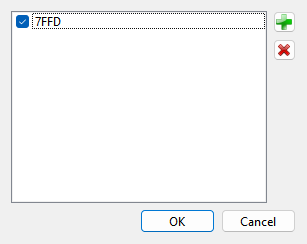
Each line is a port in hex. Four digits are a full address, matched as it is; two digits
are a byte port, matched on the low byte alone. Untick a port to stop showing it while
keeping it in the list. Of the buttons beside the list,  adds a port and
 removes the selected one. Double-click a port to change it.
The ports whose values the machine keeps in registers are added to the list automatically; untick them if you do not need them. The list is kept for the machine that is running. The Ports group of the Debugger page of Options is the same list.