Watcher
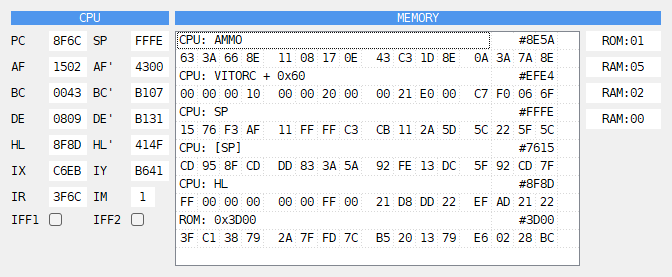
The Watcher window shows the registers and some places in memory, and follows them
while the machine runs. Open it with Tools > Watcher in the main window, or
Watcher under the  Tools button over the listing.
CPU - the registers, hex or decimal as in the CPU panel; IFF1 and IFF2 are marks.
MEMORY - the watches, two rows each.
The four memory banks, from
#0000to#C000: ROM or RAM, and the page.
In the picture the game Exolon runs, with a file of labels for it. AMMO is its ammo
counter: the first byte, 63, is 99 rounds. VITORC + 0x60 is the second frame of its
hero’s sprite. SP is the stack, and [SP] the code the routine will return to.
0x3D00 is the start of the font in ROM.
Right-click the MEMORY list and choose Add watcher to add a watch, or Delete watcher to remove the selected one. Double-click a watch to change it.
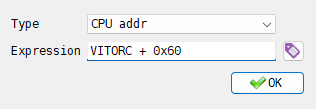
The Watcher Editor has:
Type - CPU addr reads through the current CPU mapping; RAM addr and ROM addr read physical memory. A label in a physical watch supplies its page as well as its offset;
Expression - an address, in the same syntax as a condition (see Conditions):
HL,0x5C3A,IX + 5,[0x5C53], a label. The button beside it opens the list of labels; a label picked there goes into
the field.
 OK accepts the watch only when the expression is right. The first row
of a watch shows its type and expression, and its value as an address, written as the
Debugger’s addresses are (see Hex or decimal); the second row the
16 bytes that start at that address, in groups of four.
?? means the expression cannot be worked out at the moment.
On the Next, a label in a CPU addr watch follows MMU paging. If its page is not mapped,
the watch shows ??; a RAM addr watch still reads the label’s own RAM page.
The watches are not kept when the program closes.
Watched ports
The PORTS block of the MEMMAP panel shows the last value on the ports you choose. See Watched ports.