FDD panel
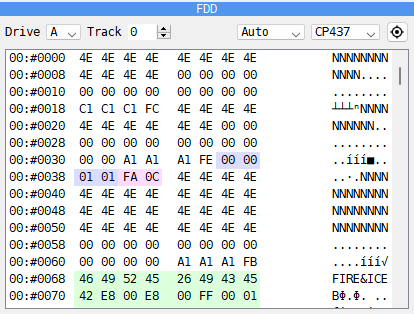
The FDD panel shows a whole track of a floppy disk as it lies on the disk: the gaps, the sector headers, the data and the checksums, byte by byte. It is on a tab beside DUMP, and only on a machine with a disk interface.
Drive - the drive, A to D.
Track - the track to show, counted with both sides: 0 is the first track on side 0, 1 the same track on side 1, 2 the next track on side 0, and so on. On a single-sided drive the number steps by 2.
Bytes per row - Auto, 8/row, 12/row or 16/row.
Code page - how the text column reads the bytes, as in DUMP: CP437, CP1251, CP866 or KOI8-R.
 The target button - jumps to the drive, the track and the byte the head is
at now.
Each row starts with the track, in hex, and the place on the track, in the form picked for
the Debugger (see Hex or decimal): 02:#0040. The byte
under the head is in bold. Sector headers are in the ID / Label color of the
Debugger page of Options, sector data in the Data color and the checksums in
the CRC color. Rest the mouse on a byte for its place, its value in hex, decimal and
binary, and the word read from it (see
Typing a number). With no disk in the drive the panel
says so: No disk in drive A. The panel cannot be edited; to change a disk’s files, use the Disk Manager (see
Floppy disks).
Use it to see how a disk is laid out: how many sectors a track has, how long they are, and whether a protected disk has a header or a checksum that is wrong on purpose.