Application page
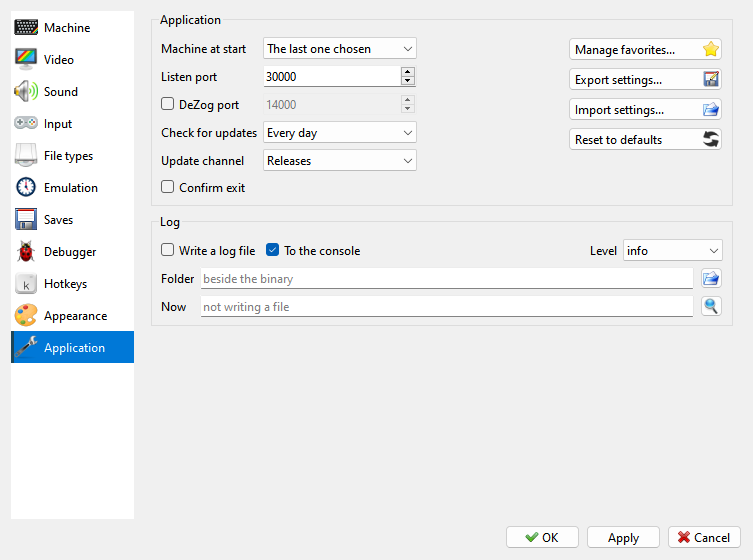
Machine at start - see Machine at start.
Listen port - the network port the program listens on, for tools that control it.
DeZog port - let DeZog debug the machine from VS Code, on this port. Only programs on this computer can connect.
Check for updates, Update channel - how often to look for a newer version, and whether development builds count; see Updates.
Confirm exit - ask before closing. Pause when inactive is on the Emulation page now.
 Manage favorites… - see Favorites menu.
 Export settings…,
 Import settings… - keep all
your settings, your own machines included, in one file, and bring them back.
 Reset to defaults - puts every setting back to its default value. Your
own machines stay.
Log - a log file of what the program does, for reporting a problem: Write a log file, To the console, Level, Folder.
Machine at start
Machine at start on the Application page of Options sets which machine Xpeccy+ starts with:
The last one chosen - the last machine you picked yourself. A machine that a file switched to does not count.
Ask - the Start Machine window asks every time.
Resume last session - the last one chosen, and then where you left off: the newest autosave, taken when the program closed (see Autosaves).
one of the machines - always that one.
At the first start you are asked (see The first start). When a machine or a file is named on the command line, the question is skipped (see Command line).