Debugger page
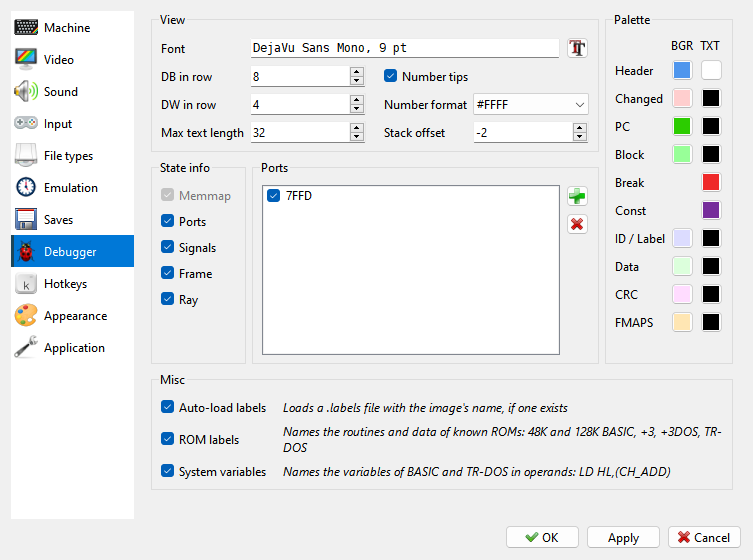
The font, the colors and what the Debugger shows.
View:
Font - the font of all the Debugger’s panels. The
 button beside it
picks one. The menus keep the font of the rest of the program.
DB in row, DW in row, Max text length - how many bytes, words or characters one line of the listing holds when it shows data instead of code. See Disasm panel.
Number tips - a number’s hex, decimal and binary in a tip when the mouse rests on it: in the listing and the dumps. On by default. See Typing a number.
Number format - how addresses and the numbers of the listing are written:
#FFFF,$FFFF,FFFFhor decimal65535. The button on the listing’s toolbar and Ctrl+Shift+H switch between hex in the form picked here and decimal. See Hex or decimal.Stack offset - where the STACK panel starts, from -16 to 16 bytes from SP. See STACK panel.
State info - which blocks the MEMMAP panel shows: Ports, Signals, Frame and Ray. Memmap cannot be switched off: the panel’s title bar, which you drag the panel by, is part of it.
Ports - the watched ports of the machine that is running. See Watched ports.
Palette - the Debugger’s own colors, each with a background (BGR) and a text (TXT) color. Click a color to change it; right-click it to go back to the color of the interface style.
Color |
Where it is used |
|---|---|
Header |
the title bars of the panels and the block names of MEMMAP |
Changed |
a value that changed in the last step |
PC |
the line of the listing at PC |
Block |
a selected block in the listing and the dump |
Break |
the lines that have a breakpoint |
ID / Label |
the ID field of a disk track, and labels in the listing |
Data |
the data of a disk sector |
CRC |
the checksums on a disk track |
Const |
constants in the listing |
FMAPS |
the TSConf FMAPS window in the dump and MEMMAP |
Choosing another interface style on the Appearance page puts these colors back to that style’s own.
Misc - Auto-load labels: opening an image also loads a .labels file of the same
name, if there is one. See Disasm panel. ROM labels: known ROMs
name their routines in the listing and show their data as data. System variables: the
variables of BASIC and TR-DOS are named in instructions, LD HL,(CH_ADD). See
ROM labels.