ZX Next panel
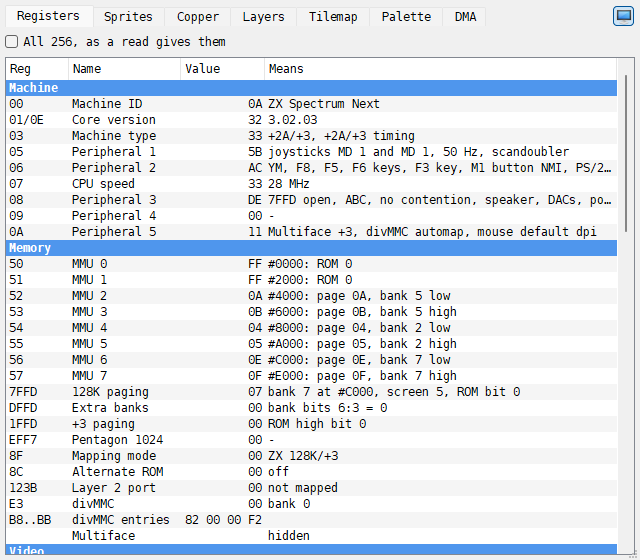
The ZX Next panel shows what the hardware of the ZX Spectrum Next is set to. It is there only on the ZX Spectrum Next, on a tab beside Breakpoints, and has seven tabs: Registers, Sprites, Copper, Layers, Tilemap, Palette and DMA. A value that changed since the last step is in the Changed color.
Like the ZX Evo panel, it moves into a window of its own, ZX Next, with
 Show in its own window, and the window follows the machine while it
runs (see The ZX Evolution window).
Registers
The Registers tab lists the Next’s registers in groups: Machine, Memory, Video, Clip and scroll, Interrupts, Copper, Sound and UART.
Column |
What it shows |
|---|---|
Reg |
the number of the Next register, or the port, such as |
Name |
its name, such as CPU speed or MMU 0 |
Value |
the value, in hex |
Means |
what the value sets, such as |
Besides the Next registers, the list has the ports and the state behind them: the 128K, +3 and Pentagon paging ports, the layer 2 port, the divMMC and the Multiface, the four CTC channels, the AY select and the DACs, and the speed of each UART. Tick All 256, as a read gives them to see every Next register, by number, as a program reads it.
Sprites
The Sprites tab lists the 128 sprites. Visible only, ticked by default, leaves out the ones that are not shown, and those that are listed but not drawn are grayed.
Column |
What it shows |
|---|---|
# |
the number of the sprite |
X, Y |
where it is |
Pattern |
its pattern; |
Pal |
its palette offset |
Scale |
|
Flags |
|
Anchor |
the anchor a relative sprite belongs to, unified or composite |
Click a sprite to see it under the list, as large as the room allows, with what it is, where and in which colors.
Copper
The Copper tab shows the copper’s 1024 instructions: Addr, Word and
Instruction (WAIT, MOVE, NOOP, HALT). The line at the top says how the copper
runs, where its PC is and where a program’s writes go. The row at the PC is lit; with
Follow PC ticked the list follows it.
Layers
The Layers tab draws one picture from memory, as it is, with no scroll: layer 2 from its active or its shadow bank, the ULA screen in bank 5 or 7, the LoRes screen, or the sprite patterns, 8-bit or 4-bit. The column on the right says what the layer is set to; move the mouse over the picture for the dot, its address and its color. A checker shows the transparent color. In the sprite patterns, the ones used by visible sprites are outlined.
Tilemap
The Tilemap tab draws the whole tile map, with no scroll (Map), or the tile definitions (Tiles) in the colors of Palette offset. Move the mouse over it to see the cell, its address, tile, attribute, colors and flips.
Palette
The Palette tab shows one of the eight palettes, 256 colors in a 16 by 16 grid: first and second for the ULA, layer 2, the sprites and the tilemap. (in use) marks the ones the layers use now. The index that register 40 points at, where register 43 writes, is framed with a dashed line. Move the mouse over a color, or click it, to see its index, value, red, green and blue levels, RGB, layer 2 priority and the layers that use it.
DMA
The DMA tab shows the DMA: under Set up, the port it was written through (Z80 DMA or zxnDMA), the direction, ports A and B, the length, the mode and the prescaler; under State, whether it runs and holds the bus, its status, the source, destination and counter now, and whether a register is half written.