divMMC
The divMMC is an SD card interface for the ZX Spectrum 48K, 128K, +2, +2A and +3, and the
Pentagons take it on their ZX-BUS. The one emulated follows Mario Prato’s original design,
which the boards sold since, such as the DivMMC EnJOY!, are built on: 8K of EEPROM for the
firmware, 128K or 512K of RAM, and two SD card slots. Its SD card port has a clock of its
own, so the card works at any usual CPU speed. Its firmware is esxDOS, which loads .tap,
.sna, .z80 and .trd files from the card and adds dot commands to BASIC. esxDOS 0.8.5
to 0.8.9 come with the emulator, by permission of its authors, Papaya Dezign, and 0.8.9 is
in the board’s EEPROM from the start.
Setting it up
Switch the board on with Media > divMMC, or on the Machine page of Options set the divMMC row to divMMC. The
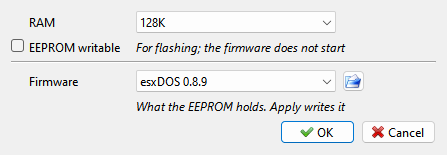
 gear opens Machine: divMMC:
RAM - 128K or 512K.
EEPROM writable - the board’s EEPROM jumper. Leave it off. When it is on, the Spectrum can write new firmware into the EEPROM, and the firmware does not start at a reset.
Firmware - what the EEPROM holds: one of esxDOS 0.8.9 to esxDOS 0.8.5, (erased), or Custom for anything else, with the esxDOS version in it when it has one. The
 button picks a firmware file. Apply writes the choice into the
EEPROM; before it replaces a Custom firmware, which may exist only in the EEPROM,
it asks.
Make a card: Media > divMMC has a menu for each slot, Card 1 and Card 2, with the name of the card in it. New esxDOS Folder… asks for a folder - an empty one, or a new one made in the same window - copies the
SYSandBINfolders of the esxDOS release the EEPROM holds into it, addsTMP, puts it in the slot and powers the machine off and on. With no bundled release in the EEPROM it asks which one to copy. esxDOS starts from the card; put your programs into the folder.Or use a card of your own. Each slot’s menu also has Open Image…, Open Folder…, Eject, Refresh and Write Protect, as the ZX Evolution’s card has. esxDOS needs an image with an MBR and one FAT16 or FAT32 partition, or a folder, holding the
SYS,BINandTMPfolders of the same esxDOS release as the EEPROM. When a folder in slot 1 holds another bundled release than the EEPROM, Xpeccy+ says so in a window after the machine is switched on: esxDOS itself does not check, and fails in odd ways.
Another esxDOS version, or a firmware of your own, goes in with the button,
or the way the real board is flashed: turn EEPROM writable on, load the flasher, such as
ESXMMC.TAP, and follow it, turn the option off, then use Machine > Reset > Hard Reset.
The Firmware row then shows what was flashed. With the EEPROM erased and the option
off, the machine stops at its first interrupt, as it does with a real board that has no
firmware.
A real board is fitted and removed with the power off, and so is this one: Apply after a change in the divMMC row, in RAM or in Firmware powers the machine off and on. There is one board, as if the same one went from machine to machine: the RAM size and the EEPROM jumper are set for each machine, but the EEPROM is the same on all of them, and is kept for the next start of the emulator.
esxDOS looks for the card and loads its system files only when the machine is switched on. A card put in later, or changed, is seen after Machine > Reset > Hard Reset, which also reads a folder used as a card again, with the files copied into it since; started with no card, esxDOS ignores the NMI button until then. A plain reset is not enough: then the firmware skips the search and keeps what it found before.
Switching it on and off
Media > divMMC switches the board on and off in one go. It is in the right-click menu too, it can be a toolbar button - a click switches, its arrow lists the cards - or have a hotkey (divMMC On/Off). While the board is on, divMMC is a menu: the same item, ticked, to switch it off, then Card 1 and Card 2. It works as the divMMC row of Options does: the machine is powered off and on, and the setting is the machine’s, kept for the next start. Since what is in the machine’s memory is lost, a window asks first. The board’s RAM, its jumper and its EEPROM stay as they were.
While the board is on, the floppy drives and the hard disk are out of the machine: the board takes the TR-DOS entry, so on a real machine the drives would sit there unused. Their lights in the status bar are dim and struck through, the Disk Manager and Drives menus show the drives grayed under a line that says why, and Options shows Floppy disk and Hard disk dimmed, the board’s row as divMMC (!), with a tip that says why. Nothing is ejected: switch the board off, and the drives come back with their disks. Opening a disk while the board is on asks to switch it off first.
Which esxDOS
The releases differ mostly in their TR-DOS emulator, which runs .trd images from the
card:
0.8.5 - the first with the TR-DOS emulator.
0.8.6 - TR-DOS Navigator boots a disk with no boot file, Beta 48 support, the
.128command.0.8.7 - saving the EEPROM to the card works, Headball GS loads.
0.8.8 -
SAVE ... BIN,GO TOwith a string variable, no parity check when loading.tapfiles, the NMI silences the sound chips.0.8.9 -
.sclimages, TR-DOSMOVEandFORMAT, and a fix for a full card whose root folder got damaged.
Each release’s own README.TXT is in config/esxdos/<version>/.
Using it
The firmware starts on every reset, then goes to 48K BASIC. Type
.lsfor the files on the card and.cdto go into a folder; the dot commands are the files inBIN.Machine > NMI (Shift+F10 in the Modern preset, F10 in the Classic one) is the board’s NMI button: esxDOS opens its file browser.
A folder used as a card takes what esxDOS saves, unless folders are set to read only (see Writing to a folder): then esxDOS reports
I/O ERRORwhen it tries to write.Machine > Reset (the plain one) is the board’s reset button, with one difference from the original board: it also clears the board’s MAPRAM setting, as the ZX Spectrum Next’s board does. On the original, only the power clears it, and a program that crashes into setting it (BREAK held during a load from the card is one way) leaves the machine with garbage or stopped until it is switched off. Here a reset brings the firmware back, warm: esxDOS keeps what it had, a tape attached in its browser included, and goes straight to 48K BASIC. After
ESXMMC.TAPhas flashed the EEPROM, the firmware runs from a copy in the board’s RAM until that reset.Machine > Reset > Hard Reset is the power switch: the board’s RAM goes with the machine’s, and esxDOS starts cold, with its logo and the card read again.
On a Pentagon whose plain reset starts Gluk Reset Service, as the Pentagon 1024 SL’s does, the plain reset starts Basic 128 while the board is on: Gluk and the divMMC do not work together (see Reset).
A tape or disk opened to be run (Run a program) starts from a Hard Reset while the board is on, so that a tape attached in esxDOS does not take the
LOAD ""instead; the keys go into the 48K BASIC the firmware leaves the machine in. A disk cannot be started this way: the drives are out while the board is on, so Xpeccy+ offers to switch the board off first. A.trdon the card starts from the esxDOS browser.The window title names the card while esxDOS reads it, by its image file or folder, as it names a disk while its drive runs.
esxDOS runs in 48K BASIC. 128 BASIC and +3 BASIC stop working with the board on, as they do on the real one.
On a machine with a Beta Disk, the board answers the calls to TR-DOS (
#3Dxx) first:RANDOMIZE USR 15616starts the TR-DOS that esxDOS runs on the card’s.trdimages, not the machine’s own. Machine > NMI is the board’s button then, not the machine’s own.A snapshot saved as SZX keeps the board’s state; other formats leave it out.