CMOS panel
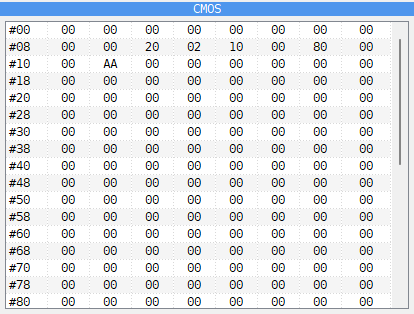
The CMOS panel shows the 256 bytes of the clock chip’s memory, eight to a row. The number at the start of a row is the address of its first byte. It is on a tab beside DUMP, and only on a machine that has a clock chip:
ZX Evolution (BaseConf) and ZX Evolution (TSConf);
Pentagon 1024 SL, and the Pentagon with the Gluk clock fitted (see The Gluk clock);
Profi v5;
any machine with the SMUC hard disk interface, such as the Scorpion ZS 256 Turbo+.
Double-click a byte and type a new value in hex to change it. Rest the mouse on it for its value in hex, decimal and binary and the word read from it (see Typing a number).
The time and date in bytes 00 to 09 are not kept here. When the machine reads them, it gets the time of your computer’s clock, so the panel shows only what a program wrote there. The settings a BIOS keeps in the clock chip are in the bytes from 0E on.
Use it to see which settings a BIOS has stored, or to change one by hand.