Sound Chip panel
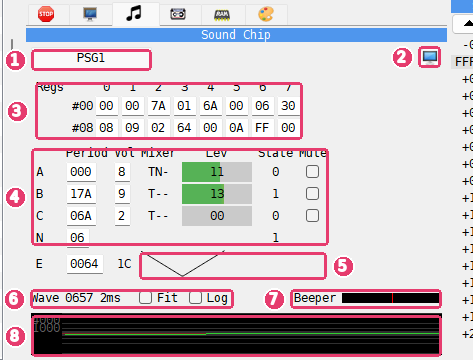
Chips - a tab for each sound chip of the machine.
 Show in its own window - moves the panel into the Sound Chips
window.
Regs - the 16 registers of the chip.
Channels - the tone channels A, B and C, the noise N and the envelope E.
Envelope - the shape of the envelope.
Wave - the peak level, the time span, and the Fit and Log check boxes.
Beeper - the level of the beeper.
Wave box - the sound the machine puts out.
In the picture the title tune of Cybernoid (Dave Rogers, Hewson, 1988) plays.
The tabs are named PSG1, PSG2 and so on, one for each AY or YM chip: a TurboSound machine has two. A chip with an FM part, as in TurboSound FM, has an FM tab beside its PSG tab. A machine with no sound chip has no tabs.
The PSG page
Regs shows the 16 registers in two rows: #00 holds registers 0 to 7, #08 holds
registers 8 to 15. Click a register and type a new value in hex. The value goes to the chip
as if a program wrote it with an OUT to the chip’s port, so the rest of the page changes
with it.
The table below it shows the same registers by channel:
Column |
What it shows |
|---|---|
Period |
the tone period of A, B and C (up to FFF), the noise period of N (up to 1F), the envelope period of E (up to FFFF) |
Vol |
the volume of A, B and C, 0 to F; on the E row, the level the envelope is at now |
Mixer |
what the channel mixes: |
Lev |
how loud the channel is, as a bar |
State |
the output of the tone or noise generator, 0 or 1 |
Mute |
tick to silence the channel |
Period and Vol can be changed as the registers can: click and type in hex.
Lev is green, amber near the top and red at the end. While the machine runs, the bar shows the loudest level of the channel since the last refresh. While the machine stands still, the bar and the number on it show exactly what the channel puts out at that moment.
State is shown only while the machine stands still. A tone generator flips much too
fast to be read while the machine runs, so the column shows - then.
Mute silences a channel without touching the chip: the program goes on writing the same registers, and the other channels play as before. Use it to pick one voice out of a tune.
The E row draws the envelope shape set in register 13: two cycles of it, so the eight shapes can be told apart.
The FM page
The FM page shows the FM part of a YM2203 chip. Across the top:
Field |
What it shows |
|---|---|
Timer A, Timer B |
the timer values in hex, and on or off |
Ch3 |
the mode of channel 3: off, special or CSM |
1, 2, 3 |
tabs for the three FM channels |
off |
tick to silence this FM channel |
Alg, Fb |
the algorithm and the feedback of the channel |
Bk/Fq |
the block and frequency of the channel |
Out |
the channel’s output now |
Under them is a row for each operator, Op1 to Op4. DT, MUL, TL,
RS, AR, DR, SL, SR, RR and EG are the operator’s register
fields: click one and type a new value in hex. St is the state of the operator’s
envelope (OFF, ATK, DEC, SUS or REL), Bk/Fq its block and
frequency, and Lev its envelope level, where a bigger number is louder. A * in the
last column marks the operators that reach the output in the channel’s algorithm.
Wave and Beeper
The wave box at the bottom shows the sound the machine puts out, all sources mixed: the sound chips, the beeper and the rest. While the machine runs it holds the last 40 milliseconds, enough to see a tune move. While the machine stands still it holds the last 2 milliseconds, fine enough to count the edges of a beeper routine one step at a time.
The number beside Wave is the highest level in the box, in hex, followed by the time the box holds. The scale at the left marks the levels.
Fit - centers the wave and scales the box to it, so quiet sound fills the box too. With Fit off, the box keeps one fixed scale.
Log - draws the wave on a curve, so a quiet tune is still visible beside a loud one.
Beeper is a bar of the beeper’s level.
Example
Watch the AY registers while music plays
Choose ZX Spectrum 128K and pick 128 BASIC in its menu.
Choose Tools > Sound Chips. The Sound Chips window opens on PSG1.
Type
PLAY "cdefgab"and press Enter.Watch channel A: its Period changes with each note, its Mixer starts with
Tfor the tone, and its Lev bar rises and falls. The wave box shows the square wave of the tone.Tick Mute on the A row and play again: the registers still change with each note, but you hear nothing.
Untick Mute to hear the channel again.